Showing posts with label Google. Show all posts

Sunday, September 16, 2012

Essential Android Apps

Did you just switch to a smartphone and don't have a clue on what apps to install? New to Android?Here's a run down of my essential Android apps that should be on your Android device. Almost all these apps are FREE by the way.

1. SwiftKey 3 Keyboard 

SwiftKey is one of the best keyboard replacements for Android. The keyboard spacing is better than the default S3 keyboard and the text prediction is one of the best you will find. The app will actually scan all your texts and email (with your permission of course) to find out what your commonly used words are. After that, autosuggestion of words becomes very intuitive. You'll be pleasantly surprised when work jargon, non-English words you commonly use, and even full hashtags are automatically suggested as you type.

Add to the spacing, it also has several color themes you can choose from. Since I use a white S3, I figured a clean white keyboard would look best with my phone.


2. AirDroid

Everyone connects their phones to their laptops. Even during the Nokia days, USB connectors were essential for transferring music, photos, and even sending texts through your computer.

AirDroid does all of that and more without a cable, via wifi, and through your internet browser.

This app connects your Android to your computer via your wifi network. Once you're connected, you can transfer files (straight to the folder you want), explore the contents of your phone, view and send text messages, and view other details of your phone.

The way the app connects your phone to your computer is pretty cool too. You first go to the AirDroid webpage where a unique QR code will be shown. Then, you open the app on your phone and use the camera to scan the QR code on the screen. A few seconds later and everything on your phone can be accessed through your browser. No typing of passwords or selecting networks/computers. Once your phone reads the QR code, it connects and you can access your phone through your browser.


There are also options to connect the two through passwords and unique URLs, but QR code scanning is the easiest and the coolest. For me, this is the best use of QR codes I've ever come across.

Connecting via your internet browser means that you don't have to download anything on your computer. As long as you have a browser (of course, it has to be updated) you can connect to your phone.


3. Dropbox

If you want to treat your phone as another drive on your computer, dragging and dropping or copy-pasting files from Explorer/Finder folders to your phone, DropBox is the best solution for you.

You have to download an application on your computer and your phone individually and set it up, but once it's done, sharing ANY file between your phone and computer is extremely easy.

A real life example: I took a screenshot on my phone which I want to include in this post. After I took the screenshot, I went to gallery and selected share to Dropbox. Now, I just browse through the files on my computer, go to to the Dropbox "drive", and then select the photo. Easy.

Additionally, Dropbox has the option to automatically save the photos you take on your phone onto Dropbox. This ensures that all your photos have a backup copy and makes it easy to view them from any web device.

Actually if you have a Google+ account, your Android phone will automatically backup your pictures to your Picasa as well. What, you don't have a Picasa account? If you have a Google account, you do.


4. The Social Network Bundle: Facebook / Twitter / Instagram

I don't think I need to explain this one. Also of note are Pinterest, Tumblr, Google+, and foursquare. If you're on these social networks, then always be on.

I'll talk about aggregators in another post. Also, see Flipboard below. 

5. The Google Bundle: Google Gesture Search / Gmail / Google DriveGoogle Goggles / Google Translate 

For me, Google Gesture Search is the simplest and smartest launcher available.

The app will index all your apps, contacts, and music. Once the app is open, use your fingers to write individual letters anywhere on the screen. The app will then search your phone and display a list of what it thinks you want to open. Whatever you want to open on your phone is just a click and a few letter swipes away.

Gesture Search will also figure out which apps, contacts, or music you access the most. So the next time you write a C, the Calculator app automatically leaps to the top of the list.


Bonus: Another app, Gesture Search Bar, allows you to open Gesture Search through the notifications (swipe down) screen. 

Yes, you have a built in email app, but if you have a Gmail account the Gmail app will be prettier and more intuitive. It will also give you access to "stars" and "important" email. If you use Gmail, ditch the default email app and make the Gmail app your primary email app.

If you use Google Drive (formerly known as Google Docs) get the app for easier access. Google Docs used to be a free online "Microsoft Office" where people can simultaneously edit a document. It still functions as such, but now has additional features.

Earlier this year, Google decided to revamp Google Docs and turned it into Google Drive. The change of name is because Google wanted to do what Dropbox is doing. Essentially, Google Drive functions exactly like Dropbox, as free cloud storage.

The main reason I use Dropbox over Google Drive is because I have 50 GB in Dropbox that I gained through referrals. My Google Drive only has 5GB of free space.

I however still use Google Drive because I have a lot of spreadsheets and documents in Drive/Docs that I work on.

Google Goggles is an amusing little app. If you want to talk about practicability, it functions as a QR code reader (3D barcode reader).

Aside from that, it recognizes logos, foreign language characters, and popular pictures and tells you what the images are. It can integrate itself into your camera so it will automatically scan whatever you take pictures of and tell you what you're shooting.

Google's mission with this app: you can already search by typing text and using your voice, Goggles lets you search through your camera.


Okay, this app is not really "essential" but Google Translate has a pretty cool trick: it can translate actual foreign speech into text. Have someone say something in another language into the app and it translates the language for you on your phone. You can then type in your response in English and the app will read the translated text to the person you're talking to in the foreign language.

It also does what Goggles does, translating text you take through your camera into English (or whatever language you like). So if there are Japanese characters on the biscuit you're eating and you want to know what it means, open the app and it will magically translate it for you.


Not exactly apps, Google Calendar and Google Contacts should be integrated into your phone already. Make sure your accounts are connected for cloud backup, anytime access from any web device, and hassle free phone upgrading.

Also, your built in photo gallery can also be linked with Picasaweb. If you have Picasa on your computer, syncing between your computer, phone, and the cloud is super easy. On your desktop, you can select albums in Picasa you want to sync to the web and it gets synced. What is on the web will also appear on your phone if your connection is always on.

Oh, the perks of being on Google.

6. SMS alternatives: Go SMS Pro or Handcent

I pick between the two for aesthetic reasons. I originally used Handcent but I switched to Go SMS Prop because I liked the iPhone-like messaging layout (I came from an iphone) and subdued color scheme.

Both apps are powerpacked with features but one of the best features available in both is the ability to schedule text messages. If you want to be the first to greet your friend a happy birthday, but you're already sleepy, you can create your message at 7pm and tell the app to send it at 12am.

If you know other people who use the same app, you can also both create an account and send free texts through the internet. There are a lot of internet messaging services out there, but since this is integrated into your main SMS app, sending internet messages becomes less cumbersome.

A unique feature of Handcent is the ability to delay text messages. Once you hit send, it waits a few seconds before it actually sends the message. Why do that? Just in case you realize that you sent your text to the wrong person or that autocorrect picked the wrong word, you still have time to hit cancel and avoid that embarrassing text.


7. *updated* If you've been here before, please don't download Double Twist. It doesn't sync playcounts back to iTunes, it only syncs it to the Double Twist desktop. They have lots of hooks for upgrades and I'm frankly not happy. I apologize for endorsing them earlier.

I am currently on the hunt for the best music players and syncers.

For sure, iSync really syncs back playcounts to iTunes. The interface however is crude and there are connection issues with newer phones.

So, the search still continues. If you have any ideas, please hit up the comments.


8. Flipboard

Quite simply, Flipboard is the prettiest way to view online content on your tablet. It excels in converting your Facebook and Twitter feed into a flippable magazine complete with automatically loaded pictures, article text, and varying layouts.

Great for tablets, pretty good for phones.


9. The always on communicator bundle: WhatsApp + Viber

If your contacts have unlimited mobile internet or if you need to communicate with people from across the world, Whats App will give you free text messaging and Viber will give you free voice calls.

The best feature for both is each app's ability to scan your contact list and tell you who among your contacts are also using WhatsApp/Viber.

In reality, Viber also has messaging features, but I find that more people are on WhatsApp.

I would have added Facebook Messenger to this list, but the existing Facebook app already incorporates the features of Facebook Messenger. If someone sends you a direct message in FB, your phone will already prompt you with a notification if you're always on and have the official FB app.

10. The Note Bundle: Any.Do + AK Notepad

The prettiest and most straightforward to-do list for Android must be Any.Do. It has a clean and minimalist interface & widget selection. It can sync with your Chrome browser on your computer so you can view your to-dos or add additional tasks from your browser.

There are a lot of notepad apps out there but (especially if you're coming form an iPhone) AK Notepad looks the most like a notepad.

Both Any.Do and AK Notepad also backup your data in the cloud. At this day and age, backing up your phone's data should really be automatic.

There are still a lot of great Android apps out there, but more on those some other time. If you're new to the Android community, these apps should maximize your connectivity and productivity already.

Enjoy!

Tuesday, June 12, 2012

12 Things I Love About the Galaxy S3

I recently bought a Galaxy S3 after owning a Galaxy Nexus and an iPhone. After deciding between the S3 and the Lumia 900, I'm convinced that the S3 is the best phone available as of today.


HERE ARE 12 REASONS WHY:

1. Off the bat, it's the speed. The quad-core just does wonders. Think about it, this phone is more powerful that probably 70% of the world's laptops right now.

2. ICS all the way. True multitasking, resizable widgets, flexibility, control. Apple and Nokia are miles away from having all these freedoms.


3. Surprisingly, the screen is just the right size. Perhaps it's because I got used to the Nexus and my other phone prior was an Xperia Arc. I'm sure people with Galaxy Notes will say that their screens are just the right size as well, but given all the biases, I think the screen is just right.


Tip: When you're moving from small screens to these big screens, it's important to realize that you have to change how you hold the phone. Instead of cupping the phone with your whole palm with fingers wrapping over the edge, your fingers just have to be at the back of these bigger phones.

When you realize the change, navigation becomes easy and you'll wonder why you kept up with such small phones in the past.

4. All the "natural" motion sensors. The front facing camera looks at your eyes to stop the phone from dimming the backlight. You can unlock the screen using face unlock, by using your voice, or by moving the phone around a certain way. You can launch the camera from standby by touching the screen and holding the phone as if you were going to take a picture. You're reading a text, put the phone to your ear and it starts calling that contact.

Needless to say, the gyroscope is used to full effect. I haven't seen a phone maximize movements so much. It actually makes sense to me now why Samsung used their human nature theme.


The gestures make sense! I never really fully appreciated the reviews until I got to use it for myself. Now, I'm a fan. I hope all future phones act this way.

5. Improved TouchWiz launcher. Coming from a purely native Nexus, I wasn't such a big fan of the TouchWiz when I started using it. My ex had an S3 and I wasn't really impressed with how the whole thing worked.

That is until I decided to just overhaul all the preset widgets. I removed everything, put in my folders, and all of a sudden, it just made sense.

I hate that I can't move the apps/trash button though. I would really rather have that in the middle much like the Nexus.

Plus points to the fact that when you reach the right or leftmost screen, it goes back to the first one. Also, when you're moving around icons on the launcher, you can actually tilt the phone to the left or right and the screens automatically move to the direction you want to go. Pretty neat.

6. Hold menu for Google search. I was looking for the omnipresent Google search bar at the top of the launcher, but I realized that if I just hold the menu button for more than a second the search dialogue appears. Now I have more room for my widgets!

7. S-Voice. It's a pretty noble effort and having been disappointed with Siri, I would say that it's at the minimum at par. I haven't really fully explored S-Voice yet, but just the fact that it tries to constantly learn how I talk is a big thing already for me.

8. Flipboard and apps. Being a former iphone user, I hated the fact that there was no Flipboard for Android. Actually, the fact that there was no Flipboard, Temple Run, and Instagram. Well folks, they're all on Android already. I think those three are the last breed of relevant apps that are iOS-centric. Certainly, software developers can not deny that there are now more users of Android than iOS.

In a year or so, there will probably be more Android apps than iOS apps already.


9. Functional standby screen. So Apple wanted to sue Google for slide to unlock? Well, the S3 certainly kicks that argument in the ass by coming up with something much better than that ancient movement.

From the standby screen, you can view time, weather, news, stocks, notes so you won't even need to open your phone. PLUS, you can pick up to 4 apps that you can launch from the standby screen by simply swiping their icons on the screen. AND, if you have messages or notifications that are pending, they appear as bubbles on the standby screen so you can simply swipe them and go to those notifications immediately.


10. It comes in blue or white. The important thing here is that it isn't black. That already says a lot about how Samsung is moving forward. Apple made a killing with their white gadgets. Why would people let go of their old phones just to get a white version? Beats me, but that's what the consumer wants.

I don't understand why it took manufacturers such a long time to realize that black was just plain dull. Safe is not good enough anymore.


11. The screen is beautiful; the sound is great. This is a great improvement from the S2 and the Nexus which sounded like it had mono speakers. Well, the S3 does still have only one speaker, but sound quality and volume is so much better now.

12. Quick controls are available from the notifications bar. All of us Android folk are used to having power buttons that control wifi, brightness, bluetooth, etc on our widget walls. The S3 has put them all on the topmost part of the notifications. It makes sense, it saves on screen real estate, and it makes you wonder why no one thought of that before.


A note about iOS 6: Please also understand that I am writing this as someone who already was using ICS. If I decide to compare this with iOS 6, there would be more to write about (and that's another article). 

Most of the improvements you see in iOS 6 are actually available in Android as additional apps. That feature is still missing in the iOS world. 

To be fair, Google and Samsung have also been getting ideas from these add-on apps and integrating them into the core OS. That may be unfair to the developers, but it's a win for the consumers in the end.


I must say that I'm really just nitpicking at this point, but for the sake of objectivity, here are some points for improvement on the S3:

1. Style wise, the silver bezel makes it look a little less modern and gives an 80s design vibe to the aesthetics.

2. Being a former Galaxy Nexus user, I'm convinced there is no need for a physical button on the face of the phone. I'm pretty sure the S4 won't have any buttons anymore.

I'm sure all the iphone users with that floating white orb on their screens will agree with this point as well.

3. The LED is too big. I love its functionality, but the light blends through the plastic and it makes the phone look a little cheap. Yes, it's great design that the light seeps through the plastic, that there is no physical LED light visible when the light is off, but it could have been executed better.

4. This is really an ICS issue, but we want to see a launcher that will work in landscape mode already. Hopefully, it will be available with the release of Jelly Bean.

5. The keyboard and the messaging app suck big time. The native ICS keyboard and messaging apps were good enough, I don't know why Samsung had to make their own versions.

Fortunately, as I've mentioned, it's easy to replace those in the Google ecosystem. I recommend using SwiftKey and Handcent SMS as alternatives.


All in all, this is the best phone I've ever held in my hands. I'm happy with my buy. And even if distribution in my home market sucks (I'm talking to you Samsung) I'll gladly be an ambassador for this phone.

As of posting, this is the best phone in circulation anywhere in the world and it is HIGHLY RECOMMENDED.


Friday, February 18, 2011

Scream for Ice Cream


Already there are details on Honeycomb's successor, Ice Cream, which is supposedly marrying the best of Gingerbread and Honeycomb.

Here I am considering a Gingerbread phone (Sony's Xperia Arc), looking at a Honeycomb tablet, and praying for a Honeycomb phone by the end of the year, and already there's a successor! These aren't just minor changes between versions either, each upgrade is a whole new experience. These transitions are incredibly fast and is a clear indicator for me that Android is the way to go.

Here come the tablets! One after the other, manufacturers are coming out with tablets that will feature the new Honeycomb OS. As I've noted before, the iOS just fails in comparison against this beast from Google. Every other competitor of the iPad before these tablets were running the wrong OS (read: Windows).

Honeycomb as an OS works. It works better than the iOS on the iPad. And as it can be used by any manufacturer, this just might be the tipping point that will strengthen the second wave of the tablet revolution.

The first real competitor of the iPad was really the Galaxy Tab. But inconspicuously, it differentiated itself from the iPad through one glaring difference: the size. To a point, that was kind of clever. It tried to define a new category and decided not to go heads on versus the Apple pioneer.

One area where the ipad is still untouchable though is the price. Brian Chen from Wired.com has a good theory as to how Apple does it: as Apple does everything in house, from OS development to retailing, they eliminate a lot of costs along the way.

Thursday, February 03, 2011

Honeycomb on the horizon


Google is coming up with Android Honeycomb soon and there's been a lot of good reviews on the net. Things are looking very promising. This early, I can say that I am definitely not going to buy an ipad. It just seems to be lagging in features—actually, as it always has.


High on the praise list for Honeycomb is how widgets don't have to snap to a wide grid. This means that your tablet is already starting to work more like how a computer's user interface works. There will also apparently be options at the top of the screen where you can toggle menus and other application options. Again, computer behavior floating to the top.

This is the most fluid Android OS I've ever seen by far. Check out this hands on video from TechCrunch:


The obvious fault of early Windows tablets was that it was a computer OS shoved into a tablet. The processing power in the tiny devices just wasn't strong enough, rendering these early renditions too slow. But beyond that, using them they just didn't feel right. It was a mouse and keyboard centric world trapped in a touch interface (they even wanted you to use a stylus).

Apple started it right. They picked a behavior and built the tablet around it. Even the applications were built specifically for how the tablet was used. Although they were immensely successful at creating a new category, they now have to evolve faster than Google.

Google is already moving in the right direction. The ipad just isn't fulfilling its potential. Although for some people, simplicity is a distinct advantage, when Google cracks how to fully maximize the tablet, opening it up to a universe of applications that the ipad just can't hack, Google's OS will rise the way Windows 3.1 once did.

It doesn't help that Steve Jobs is sick.

The future of the ipad will mean that MacBooks will be rendered obsolete. If you can edit photos and videos on an ipad, when they reach 15 inches and more, when they have the processing power neatly hidden in a thin sheet, why would you still need a laptop? Google's laptop quite frankly sucks and failed with the critics. They've got nothing to lose moving into this direction. Incidentally, it was earlier reported that ipad sales were actually bigger than MacBook sales in 2010. So it looks like this is really the way to go.

So the question now is, who will get there first? And remember, there are two dimensions to this race: operating system and hardware. Honeycomb is definitely getting close to the ideal state. If Google can keep this pace and decent hardware options appear, watch out Apple, the end is near.

Monday, January 31, 2011

Zeitgeist 2010

I saw this video a few days ago and decided to share it still.


We're a month into the year and I think it's a great time to reflect on the hopefulness and ambition we had 30 days ago.

It's going to be an awesome year. It's totally in our hands still. Keep on going. Don't stall. Do it now.

Incidentally, I started a FB page that should keep you inspired through the year. It's called GV Quotes (also, follow it on Twitter). It's actually a project I started a few weeks ago. The purpose is really just to share positivity. Like it. Be a fan. Contribute.

11 months to go. Let's do this people!

Getting fit through Google

Stumbled across this video from Google:


If I only had an Android phone, I'm pretty sure that I would get that wifi weighing scale and pedometer. Actually, there should already be a pedometer app by that time.

I think autosync is a good thing. I used to (because I haven't been running in a while) really appreciate Nike+ tracking my workouts. A visual representation (especially using graphs) of your workouts can actually encourage you to push yourself more. Seing how much (or how little) you run at x pace through y distances and z times plotted in tables, graphs, or even through a "wall" can help you plan and set goals better.

If you think about it, it puts the work of a personal trainer into your hands. It's a great idea.

Of course, this is another example of how Google runs our lives. But again, I'm not complaining. I really am just waiting for Android to match up to the flawless UI that my iphone provides. I digress.

For now, I am stuck with Nike+ (which by the way is connected to my Apple devices) and I have no way of monitoring my weight. That still works, but I'm sure I'll get more progress if more of my activities were tracked.

What gets measured, gets done.

Monday, June 28, 2010

Google knows what's on my mind


I just got home and I wanted to know what match is going to be played at 10pm.

I just type "worldcup", hit enter..


..and not only does Google give me who's playing the 10pm game, but also gives me details on previous matches, upcoming matches, and gives me the schedule in Philippine (local) time.

I didn't even have to go to the Google page anymore, I just typed the search parameters (or in this case the word) in my browser's address bar.

You really can do a lot with Google search shortcuts. Here are a few of my favorite Google search tips and tricks:

Currency covertion Simply type how much you have in whatever currency and value you have and what you want to convert it to and it gives you the conversion based on the day's conversion rate. Very useful when shopping online and stuff like figuring out how much plane tickets bought in another country costs. i.e. "20USD to Php"


Math Computations Similarly, you can type simple mathematical equations. No equal sign required. i.e. "square root of 100" or "25*47" or "23 to the 5th power"


International Time You want to remind your friend in the US to bring you home an EVO 4G. Is it an odd time to call? Just type the place and the word "time" in the search box and find out. i.e. "san francisco time"


Measurement Conversion Whether it be Metric to English, Celsius to Fahrenheit, or whatever else you can think of. Just type it and search. i.e. "5 feet nine inches to cm"


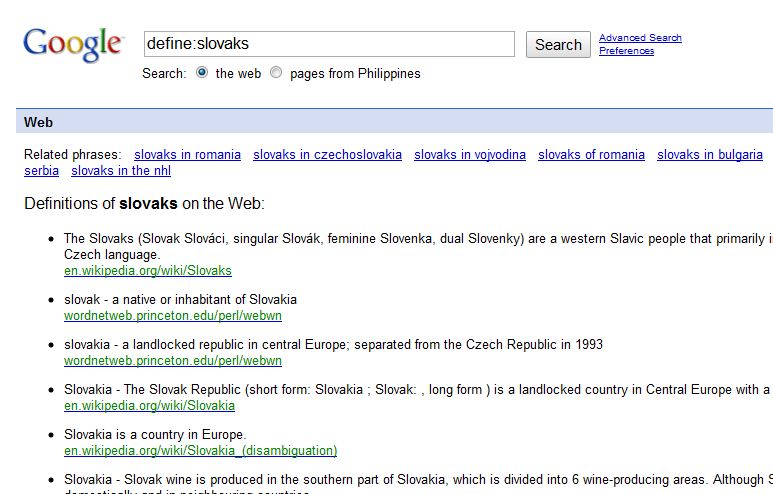
Word Definitions And last, my favorite thing to search on Google, word definitions. Simply type "define:" immediately followed by the word, and you get definitions from various sources. i.e. "define:slovaks"


It's simple, quick, direct, and intuitive. Yet another reason why I love Google.

Friday, June 25, 2010

Google TV Compatible Devices Available This Fall


Last month, Sony finally announced the first HDTV with integrated Google TV compatibility. This is a big step forward for Google TV as Sony is a major player in the TV market.

Logitech also announced earlier this month a set top-box that will integrate Google TV to your current entertainment setup called Revue. It will supposedly work well with your Android phone or iphone. It will also connect to keyboards and mice, but controlling via smartphone is a better selling point.


I think that a set top-box defeats the point of Google TV. We've seen this kind of device before (and Logitech has produced several). For me one of the defining and differenciating elements of Google TV is its integration with existing devices. You shouldn't have to pay for an additional device to access it. When you buy a new TV, BlueRay/DVD player, or game console, it should already be Google TV enabled.

Perhaps Logitech is just cashing in while the technology is new, and hey, not everyone is going to buy a new TV, player, or console just to get Google TV.

Both the Sony HDTV and the Logitech Revue are set to be released in the third quarter.

I wonder if the new Xbox will support Google TV. Sony makes the PlayStation, which is the mortal enemy of the Xbox. Microsoft makes the Xbox and owns Bing--which is arguably the closest rival of Google Search.


With pictures from ixplora

Wednesday, June 02, 2010

Can't Wait for Google TV

Yet another Google creation that will change our lives.

You may be thinking that the concept of internet TV isn't really new. But the difference this time is that Google TV is a platform. You don't need to buy a box to access it. It will be integrated directly into TVs or boxes (i.e. TiVo, cable box, dvd player). Just connect it to the internet, and access Google TV.

So in the same way that you can use Google search from any internet device, you can access Google TV from any Google TV-enabled device.


And as a guy who loves the internet, TV, and anything FREE. This is just perfect. It's like I get an additional cable package for free. I don't need to buy any new hardware cause the TV will come with everything I need to access Google TV. What's more, in a world where your cable doesn't provide HDTV, you can get HDTV for free streamed right to your TV.

I've improved WIFI reception to my room just for this. Too bad, I have to buy a new TV cause I just got one late last year. Still dreaming of the perfect internet/computer/TV/home entertainment system. But I am getting ahead of myself.

For now, let's all just wait.


*update* Sony has announced the first HDTV with Google TV Compatibility